
Here you’ll find practical tips and advice on how to use your Parish Safeguarding Hub (hub or the hub) and thirtyone:eight. If you need help with either platform, support is available from the Parish Safeguarding Support Assistants (PSSAs).
They offer:
- Online and in-person support sessions
- Flexible appointment times
You can:
- Book a session via the Safeguarding Team Support for Hub and ThirtyOne:Eight page
- Email: safeguarding.admin@salisbury.anglican.org
Additional online tutorials are available through the Diocese of Salisbury Learning Hub, Courses, Events & Resources – Diocese of Salisbury Learning Hub.
How to get started with your hub
On your hub, you will be creating records for each volunteer and staff member in your parish. We recommend that you start by reviewing records you may currently hold elsewhere to check they are correct before you start transferring them to the hub.
Log in to your hub and create the roles that exist in your parish using the Role Creator. Your hub has four pre-set roles by default: PCC member, DBS administrator, Safeguarding Officer and Churchwarden. You can build your role list to reflect your parish’s structure. You can opt to use the hub to create role descriptions and person specifications and also if you would like it to track the recruitment of volunteers taking on a role in the parish.
In People Manager, enter each volunteer and staff member’s details. You only need to enter their full name. For those individuals who require a DBS check or safeguarding training, enter their email address to enable DBS initiation by the hub. The system can also send reminders for safeguarding training. Once you have entered someone’s email address, the system automatically emails them to ask permission to use their email address.
In People Manager, assign each person their role(s) by selecting their name. You can assign multiple roles to one individual if applicable.
For roles where you have requested the hub to track recruitment, you are also able to assign volunteers to these roles if they are going through the process of recruitment. This allows you to follow the safer recruitment process for the volunteer.
Enter DBS and training information for everyone according to their assigned role(s). The system prompts you if the volunteer is missing a required DBS or training record.
All volunteers and staff recruited by your PCC should be included in your hub. This includes Lay Pastoral Assistants and Lay Worship Leaders.
Common roles within each parish are detailed below, along with their DBS and training requirements.
| Role | DBS requirement | Safeguarding training requirement |
| PCC member | Enhanced child and adult | Basic; Foundation |
| Churchwarden | Enhanced child and adult | Basic; Foundation |
| Lay Pastoral Assistant | Enhanced child and adult with child and adult barring | Basic; Foundation; Raising Awareness of Domestic Abuse |
| Lay Worship Leader | Enhanced child | Basic; Foundation; Raising Awareness of Domestic Abuse |
| Commissioned Lay Pioneer | Enhanced child and adult with child and adult barring | Basic; Foundation; Leadership; Raising Awareness of Domestic Abuse |
| DBS administrator | Basic | Basic; Foundation; Safer Recruitment and People Management |
| Parish Safeguarding Officer | Enhanced child and adult | Basic; Foundation; Leadership; Raising Awareness of Domestic Abuse; Safer Recruitment and People Management |
Although your hub includes four pre-set roles by default – PCC member, DBS administrator, Parish Safeguarding Officer, Churchwarden – you will need to review the DBS training requirements for each role to ensure the correct levels have been set.
The following roles should not be included in the hub as they are licensed and managed directly by the DBF:
- Clergy
- Permission to Officiate (PTO)
- Licensed Lay Ministers (LLMs)
If someone in one of these positions also holds another role in your parish, enter them in your hub and assign only their local role(s). They will already have a DBS check from the DBF, but you must still verify that their DBS certificate meets the requirements of their local role(s).
Please note that the DBF does not share DBS information with PCCs. It is the responsibility of each individual to share their DBS certificate, in accordance with our DBS Handling Policy. Similarly, it is the responsibility of each individual to share their training certificates with hub owners so that they can keep accurate and up-to-date safeguarding records.
For more general information about roles in the hub, please refer to Clearly Simpler’s FAQs.
DBS checks can be started either on thirtyone:eight or from your hub. Starting the DBS check from your hub means that you do not need to enter candidate’s data in two systems, and that the DBS record automatically updates in the hub when it is complete.
When your hub is first created, it does not come with the functionality to start DBS checks. You need to follow the below steps to switch this function on.
- Ensure that your thirtyone:eight subunit has been created and that the lead recruiter has set up the account (they will receive an E-Bulk Recruiter Acceptance email on completion).
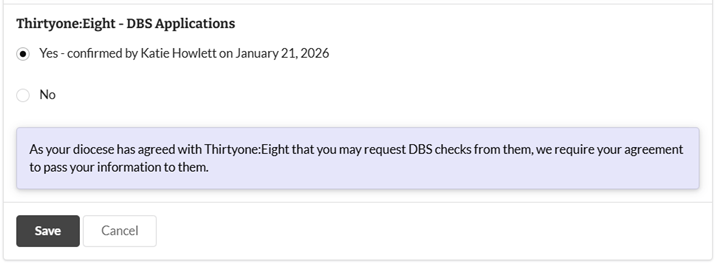
- In your hub settings, allow your data to be shared with thirtyone:eight for processing DBS checks. This option is found under Data Sharing and will only be visible once you have agreed to the Service Agreement.
- Read the detailed user guide provided by Clearly Simpler to find out how to get started using the DBS function in your hub.
We recommend visiting Clearly Simpler’s Tutorials page where you can watch short videos that walk you through using your hub.
thirtyone:eight
In addition to the traditional manual ID check, where identification documents are viewed in person, there is now a digital ID verification option. This allows individuals to securely upload their ID documents using their mobile phone or tablet, eliminating the need for an in-person meeting. This service is currently not available for the Channel Islands, but we are working with thirtyone:eight to extend availability. Everyone is encouraged to use this service, which is provided by Trust ID, a verified partner of thirtyone:eight. The digital ID option can be selected at any point during the DBS request process.
If someone attempts a digital ID check but does not pass, the recruiter is notified and can complete a manual ID check instead. We recommend that recruiters offer advice and support to ensure that candidates upload their documents correctly during the digital ID check to help prevent failure. Please see this guide page on how to capture the best document image. The digital ID verification service is only available for people aged 18 and over.
thirtyone:eight has a range of tutorial videos that provide guidance. We recommend you watch these videos when you have received your account details and have activated your account by logging in. Please visit the thirtyone:eight Recruiter Guide page to access the tutorials. We have also added some of these recruiter guidance videos to our Learning Hub.
1. Register for a thirtyone:eight Members Portal account. Please note: this is separate from your DBS management (E-Bulk) system login.
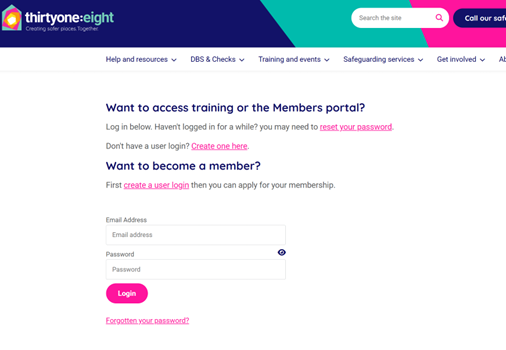
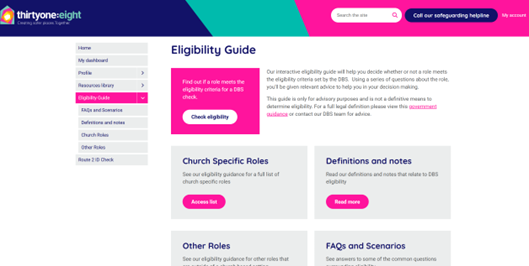
2. Once registered, sign in to the Members Portal to access the Eligibility Guide.
3. The guide provides up-to-date information to help you decide the appropriate DBS level for each role.
thirtyone:eight regularly updates the Eligibility Guide to reflect the latest DBS policies and guidance; it can only be accessed by logging in to your Members Portal.
To add a new recruiter to your account, please complete this form and send it to safeguarding.admin@salisbury.anglican.org.
When you begin using your hub and thirtyone:eight, please use thirtyone:eight’s Interactive Eligibility Guide to determine whether a role requires a DBS check and what level of check is needed. Please note: DBS levels for Lay Pastoral Assistants and Lay Worship Leaders are set across the diocese and have been agreed with thirtyone:eight. Please ensure you use the full role title when completing Section Y to avoid queries from thirtyone:eight, and also use the following DBS levels:
- Lay Pastoral Assistant: Enhanced child and adult with child barred lists and adult barred lists
- Lay Worship Leader: Enhanced child (without barred lists)
Occasionally, a DBS check will return information about an applicant, such as a criminal conviction or other relevant details. This is sometimes called a ‘blemished’ or ‘positive’ DBS check.
If this happens, the DBS system will let you know that the check needs further review, but it will not show you the information recorded on the certificate.
How will I know if a DBS check needs further review?
- If you are using the Thirtyone:Eight E-Bulk system, the result will say: ‘Please wait to view the applicant’s certificate’.
- If the check was started through your Safeguarding Hub, the applicant’s record will say: ‘DBS check is under review’.
What do I need to do?
If you receive either of these messages:
- Contact the Diocesan Safeguarding Team by emailing safeguarding@salisbury.anglican.org.
- The applicant will need to show you their original DBS certificate, and you will need to inform the Safeguarding Team what is written on it. The Team can review the information and carry out a risk assessment with the relevant parish.
- The Diocesan Safeguarding Team will advise the parish once the risk assessment has been completed and a decision has been made about whether the applicant can undertake the role.
Important: The applicant must not start the role until the Diocesan Safeguarding Team has completed the risk assessment and confirmed that they can proceed.
Please do not update the DBS check on the E-Bulk system to show that the certificate has been seen or that the applicant is clear to work.
This must be done by the Diocesan Safeguarding Team once the risk assessment is complete.
If you are unsure what to do, please contact the Diocesan Safeguarding Team for advice.
Support: thirtyone:eight and Clearly Simpler
To help you receive the right support from thirtyine:eight or Clearly Simpler, please direct your enquiries to the appropriate contact below.
thirtyone:eight subunit login settings:
For assistance with thirtyone:eight subunit setup or login details, contact:
Matthew Coady – thirtyone:eight Account Manager
accountmanager@thirtyoneeight.org
0303 003 1111
Safeguarding hub technical support:
For any technical issues or support relating to your hub, contact the Clearly Simpler’s support team.